Skip to content
Galileo · Loan origination
  1. Intake: The application, its documents and the applicant's identity, collected through the form you design.
  2. Underwriting: Specialist agents read the evidence and your credit policy, and reason to a recommendation.
  3. Decision: The agents recommend. A person with the right authority signs.
  4. Offer: The offer and closing steps your workflow sets out for the product.
  5. Funding: Security registered and confirmed by the registry before the loan is funded.
The stages of every application

Galileo is an agentic loan origination system for banks, NBFCs and lenders.

Specialist AI agents read each application, its documents and your credit policy, and recommend an outcome with the evidence behind it. A person with the right authority signs.

How it works

Three steps on every application.

01

Reads

Galileo reads the application and its documents: identity, payslips, bank statements, accounts, invoices and valuations. It also reads the passages of your credit policy that are closest to the application.

02

Reasons

Specialist AI agents weigh the evidence, your rules and your scorecards, and reason to a recommendation. Every claim must cite evidence. A claim with no evidence is rejected.

03

Refers

The recommendation goes to a person with the right authority, who signs. Guardrails send a file to a person. That person can set the AI aside and decide the file themselves.

Design products

You design your loan products.

Set the terms, eligibility, pricing, fees, documents, application form, workflow, rules and scorecards yourself. Or describe the product in plain words and the design assistant drafts it.

  • The assistant asks only what it cannot work out from your words.
  • Every change is a new version.
  • A second person approves each version before it serves applications.
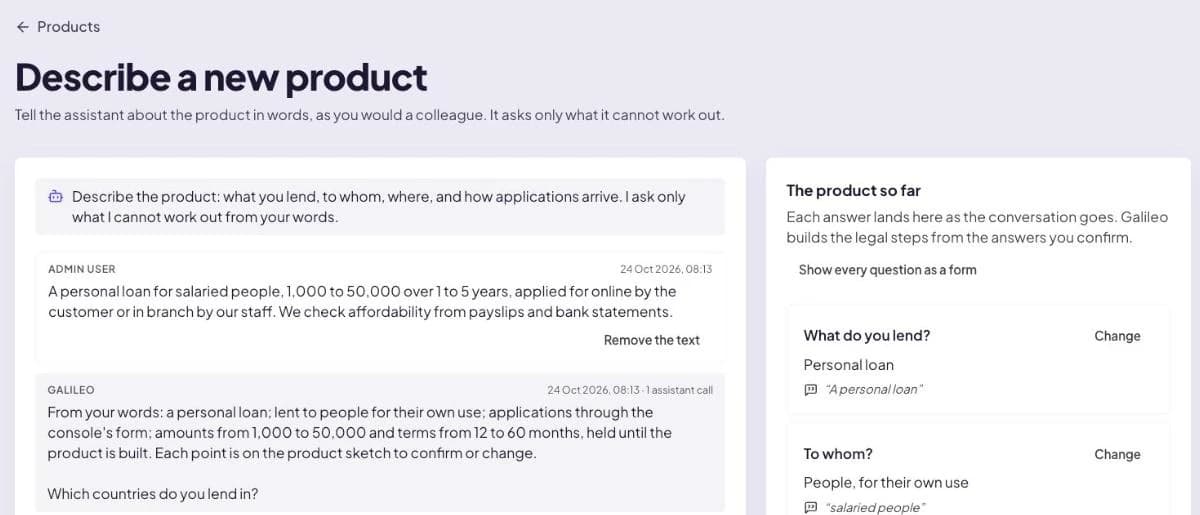
How products are designed
Galileo · Describe a new product
The design assistant. On the left, a lender describes a personal loan for salaried people in plain words, and the assistant restates the product and asks one question it cannot work out. On the right, a panel titled The product so far lists each answer with the words it came from.
Describe the product in plain words. The assistant drafts it and asks only what it cannot work out.Full size: Describe a new product screenshot
Policy and rules

Your credit policy, read on every application.

Your credit policy is loaded into a policy library and split into passages. Each underwriting run is given the passages closest to the application.

  • Search the library with a question and see the passage that applies.
  • Each rule states its reason in plain words.
  • Each rule cites the policy section it follows.
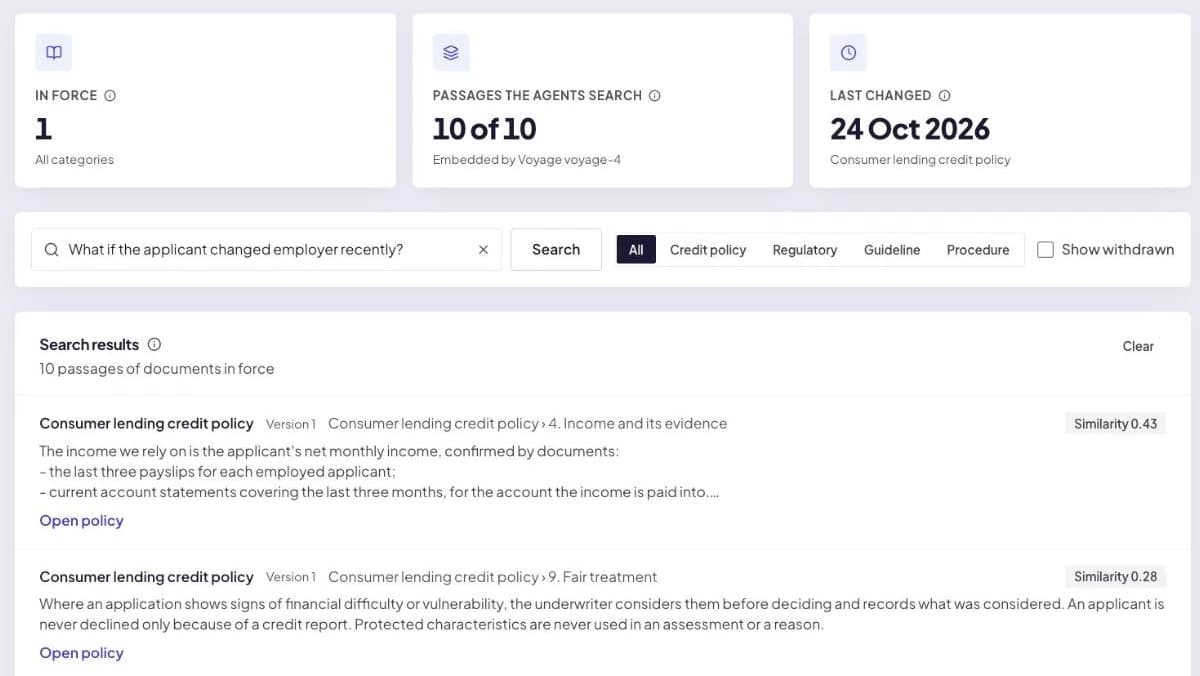
How policy and rules work
Galileo · Policy library
The policy library. A search for 'What if the applicant changed employer recently?' returns passages of the lender's consumer lending credit policy, led by the section on income and its evidence, each with its section heading and a link to open the policy.
Your credit policy, split into passages the agents search. A question returns the passage that applies.Full size: Policy library screenshot
Agents and evidence

Agents reason from the evidence in the file.

Specialist AI agents read the application, its documents, your policy and your rules, and reason to a recommendation. The reasons name the policy rules they rest on.

  • Every claim must cite evidence.
  • A claim with no evidence is rejected.
  • Rules and scorecards are inputs the agents weigh.
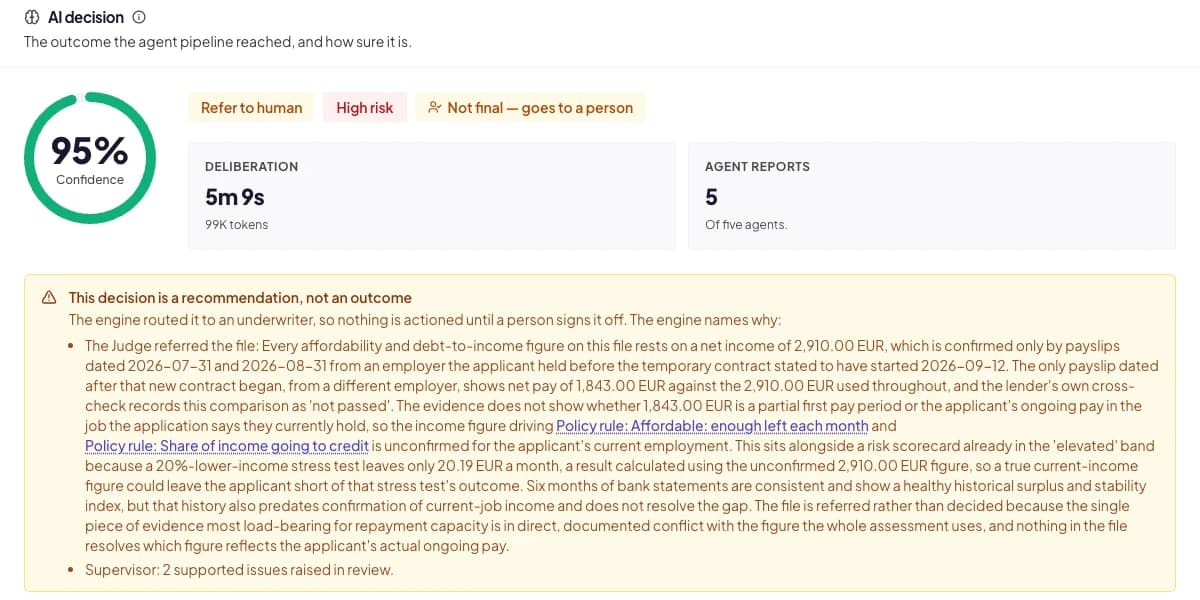
How the agents reason
Galileo · AI decision
The AI decision on an application: refer to a person, with a confidence figure, the deliberation time, and five agent reports out of five. A panel explains that the decision is a recommendation, not an outcome, and gives the reasons, naming two of the lender's policy rules on affordability and share of income going to credit.
The recommendation, with the agents' reports and reasons that cite your policy rules by name.Full size: AI decision screenshot
People decide

The agents recommend. A person signs.

Guardrails send a file to a person. A person with the right authority signs the decision, within approval limits you set by product and amount.

  • The decision card shows what the agents recommend and why.
  • The person signing can set the AI aside and decide the file themselves.
  • Each signature is recorded on the decision.
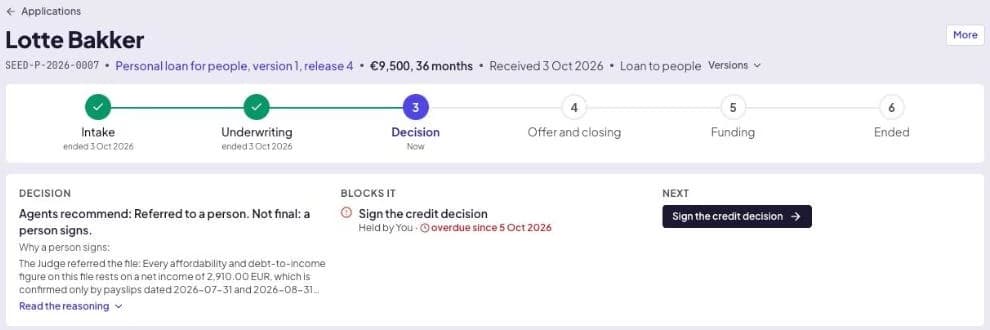
How people decide
Galileo · Application
An application's progress through six stages: intake and underwriting complete, decision current, then offer and closing, funding, and ended. The decision card reads: Agents recommend, referred to a person. Not final, a person signs. The next action is to sign the credit decision.
An application's stages, and the decision card: the agents recommend, a person signs.Full size: Application screenshot
Every decision on record

Every decision can be replayed step by step.

Each decision is recorded with its evidence, reasons, policy version and signatures. The agents' recorded reasoning can be played back step by step.

  • A full audit trail for every application.
  • The policy version in force is recorded with the decision.
  • The record can be downloaded.
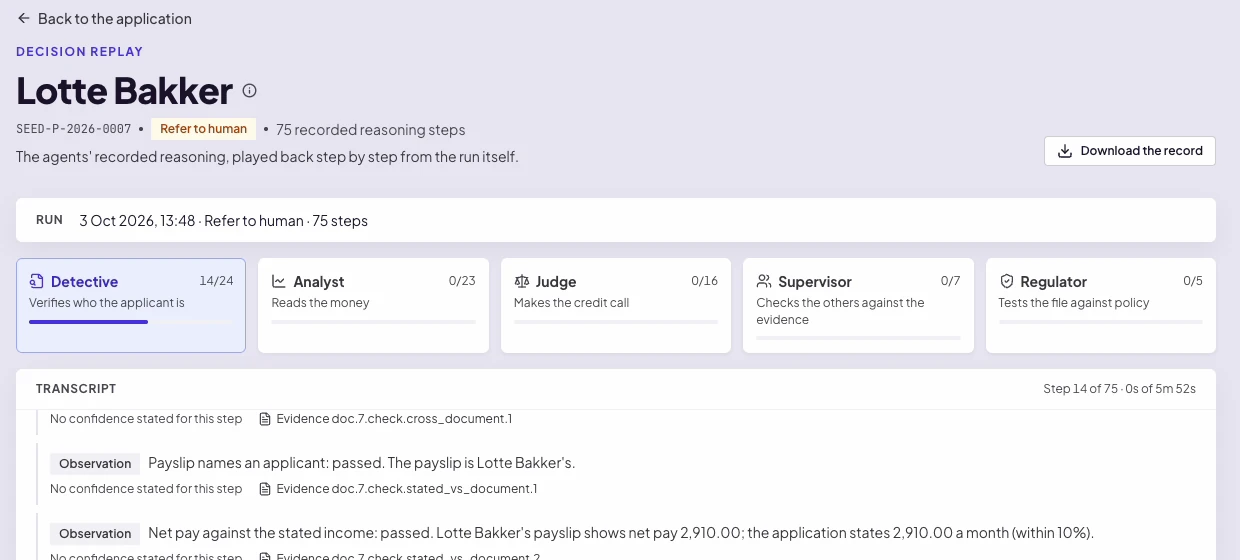
What is recorded
Galileo · Decision replay
The decision replay for an application referred to a person, with 75 recorded reasoning steps. Five agents are shown with their roles: Detective verifies who the applicant is, Analyst reads the money, Judge makes the credit call, Supervisor checks the others against the evidence, and Regulator tests the file against policy. Below, a transcript plays back each observation with the evidence it cites.
The agents' recorded reasoning, played back step by step from the run itself.Full size: Decision replay screenshot
Principles

How a recommendation is reached.

No opinion without evidence

An agent may not state a score, rating or verdict that no evidence supports. A claim with no evidence is rejected.

Rules are inputs

Rules and scorecards are inputs the agents weigh. A rule never approves or declines an application on its own.

A person signs

The agents recommend. A person with the right authority signs, and can set the AI aside and decide the file themselves.

Every figure with its parts

Every figure is shown with the parts it was calculated from, so anyone reviewing the file can check it.

Where Galileo stops

Galileo covers origination, from the first enquiry to the loan being funded.

Your loan management system runs the loan after funding. Galileo reads loan data back from it to monitor covenants and to inform new applications from the same borrower.

Loan products

Loans to businesses, individuals and groups.

Each product is set up with its own terms, documents, rules and workflow. Security can be any asset you define, with its own valuation.

For businesses

  • Term loans
  • Working capital and revolving credit
  • Equipment and vehicle loans
  • Commercial property loans
  • Invoice finance
  • Trade finance

For individuals

  • Personal loans
  • Car and two-wheeler loans
  • Home loans
  • Loans against property
  • Gold loans
  • Consumer durable and point-of-sale finance
  • Hire purchase and leasing

Group lending

  • Microfinance and joint-liability group loans
  • Loans to several borrowers
See every loan product
Pricing

Two fixed prices. No charge per user.

How pricing works

Implementation

A fixed price, agreed in writing after a scoping session, before work starts.

The price does not change for the agreed scope.

Subscription

A fixed monthly fee for the term of the contract.

No charges per user, per seat, per licence or per application processed.

Contact

Talk to us about your lending.

Tell us which loan products you offer and the systems you use today. We will take you through Galileo with your products in mind.